
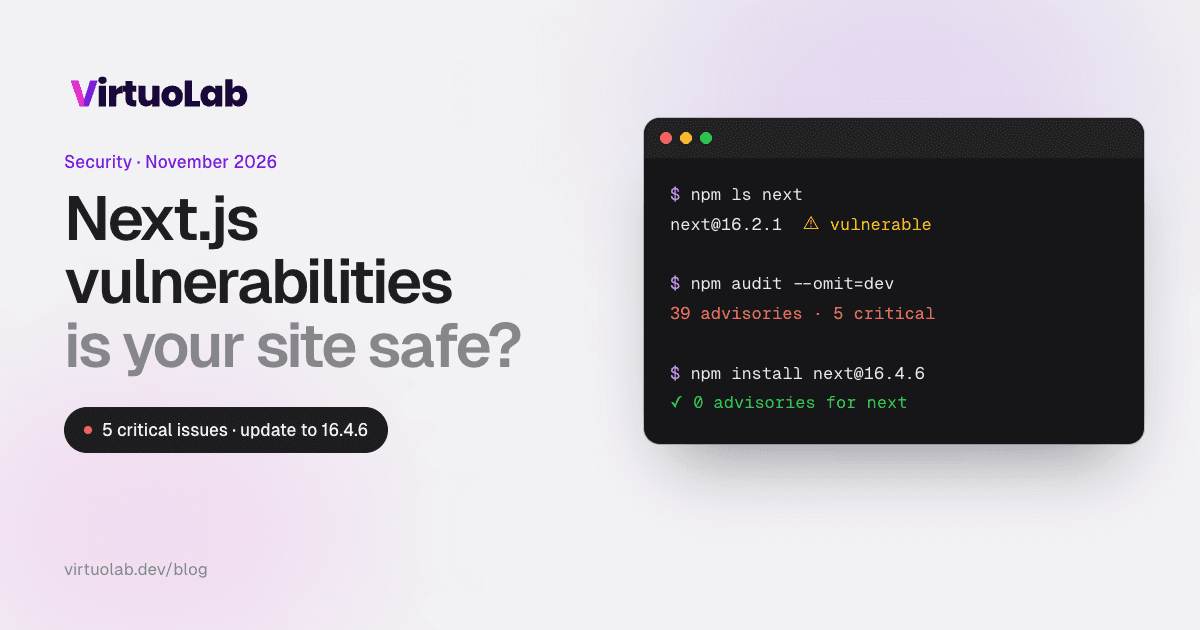
Next.js, the framework behind a large share of modern websites and web apps, had five critical security vulnerabilities in 2026. Three of them let an attacker run code on the server without logging in. On 24 November 2026 we saw attackers in the logs of our own server probing for exactly these vulnerabilities. This article explains which versions are affected, what we saw, how to check in five minutes whether your site is safe and what to do if it is not.
What is going on with Next.js?
Next.js is an open-source framework by Vercel for building websites and web applications with React, and it runs sites ranging from small businesses to large brands. In 2026 the Next.js team published an unusually large number of security advisories. When we ran npm audit on 24 November 2026 on a project using version 16.2.1, it reported 39 advisories for the next package, 5 of them critical and many of them high. The critical vulnerabilities sit mainly in parts that run on the server: image optimisation (/_next/image), the use cache caching function and share-image generation with next/og. There are also vulnerabilities that let an attacker freeze the server through Server Actions, and vulnerabilities that make the server send requests to addresses that should only be reachable internally. That last category is called server-side request forgery (SSRF). For businesses with a Next.js site the conclusion is simple: if you have not updated this year, you are almost certainly running a vulnerable version.
Which Next.js versions are vulnerable?
Every Next.js version before 16.4.1 (in the 16 line) and before 15.5.28 (in the 15 line) contains at least one critical or high vulnerability; 16.4.6, the latest version at the time of writing, is safe. The most important advisories, with the version that fixes them:
use cache functions returning typed arraysnext/og (ImageResponse)The two newest critical vulnerabilities were published on 22 October 2026. Versions below 15 no longer receive updates and can only be made safe by upgrading.
What did we see in our own server logs?
On 24 November 2026 we were investigating a memory problem on the server behind virtuolab.dev, and in the logs we found two kinds of requests that did not come from ordinary visitors. The first kind kept producing the same error: Failed to find Server Action "x". A Server Action is a server function that a page can call through a special request. Someone was sending requests with a made-up name, "x", most likely to test whether the site uses Server Actions and is therefore open to the vulnerabilities that freeze the server. The second kind was more dangerous: Failed to proxy http://169.254.169.254/latest/meta-data/iam/security-credentials/. On cloud servers such as Amazon's, that address is where the server fetches its own access keys. An attacker was trying to use an SSRF vulnerability to make our server fetch those keys. For us the request timed out, because our server does not run on Amazon. At that moment virtuolab.dev itself was still running Next.js 16.2.1; the same evening we updated to 16.4.6.
How do you check whether your website is vulnerable?
You can check in five minutes whether your website runs a vulnerable Next.js version, in four steps. Step 1: find out whether your site uses Next.js. Ask your developer, or look at the source code of a page: references to /_next/static/ almost always mean Next.js. Step 2: check which version is running. In the project it is listed in package.json under "next", and the command npm ls next shows the version that is actually installed. Step 3: run npm audit --omit=dev in the project folder. If next appears in the list as "critical" or "high", your site is vulnerable. Step 4: search your server logs for the traces we found, for example with grep -E "Failed to find Server Action|Failed to proxy|169.254.169.254" on your app's log files. If you find them, your site has at least been scanned. That does not mean someone got in, but it does mean the update cannot wait another day.
What should you do if your site is vulnerable?
If your site runs a vulnerable version, update Next.js to 16.4.6 (or at least 16.4.5), or to 15.5.28 if you stay on the 15 line, and redeploy the site straight away. Step 1: run npm install next@16.4.6 and update eslint-config-next to the same version. Step 2: run npm audit --omit=dev again; next should no longer be listed. Step 3: rebuild the site and test the most important pages and forms. Going from 16.2 to 16.4 did not break any code for us, but always test it. Step 4: deploy the new version. Even on a hosting platform such as Vercel, the version in your project is what runs; the platform does not update it for you. Step 5: if you cannot update right away, reduce the risk. Temporarily disable image optimisation with images: { unoptimized: true } in next.config, and block outgoing traffic from the server to 169.254.169.254 if your app does not need it.
How do you know whether someone already got in?
Whether someone already got in shows up as traces on the server itself, and after finding the scans we ran this check on our own server too. Check six things. 1) Look in ~/.ssh/authorized_keys to make sure it only contains keys you recognise. 2) Check whether any user accounts were added that you did not create. 3) Review the process list, for example with ps aux, for unknown programs, especially ones using a lot of CPU; cryptominers are a common payload. 4) Look in /tmp and /dev/shm for unknown files. 5) Use ss -tnp to check whether the server has connections to unknown addresses. 6) Use last to see who has logged in recently. If you find anything suspicious, assume the passwords and API keys in your .env file are known as well, and replace all of them. On our server we found none of these traces: only our own keys, no unfamiliar processes or files and no unknown connections.
Why did Next.js have so many vulnerabilities in 2026?
Next.js had so many vulnerabilities in 2026 because the framework does more and more on the server, and because it is so widely used that researchers and attackers look for weaknesses in it on purpose. Where Next.js used to mainly prepare pages in advance, it now also handles forms through Server Actions, resizes images on the server, generates share images and keeps its own cache. Each of those features accepts input from outside, and that is exactly where vulnerabilities appear. All five critical vulnerabilities this year sit in server features like these. That does not make Next.js a bad choice: the team publishes vulnerabilities openly and fixes them quickly, and WordPress and PHP also had serious vulnerabilities this year. It does mean a Next.js site needs maintenance. A site that is never updated after launch becomes vulnerable within a few months, however well it was built.
What did we change on our own server?
After the scans we changed four things on the server behind virtuolab.dev on 24 November 2026, and we apply the same to clients we host. First, the site now runs Next.js 16.4.6, with no open advisories for next in npm audit. Second, we no longer build new versions on the server itself; we build them beforehand and only put the result on the server. Building takes a lot of memory, and a server that is out of memory copes worse with attacks that target memory. Third, the site has a fixed memory limit: if the process goes over it, it restarts itself instead of taking the whole server down. Fourth, we now check npm audit with every update. Would you like us to check and update your Next.js site, or fully manage your server? See hosting, VPS and cloud or cybersecurity, or request a free quote.