What does the LiveCast demo show?
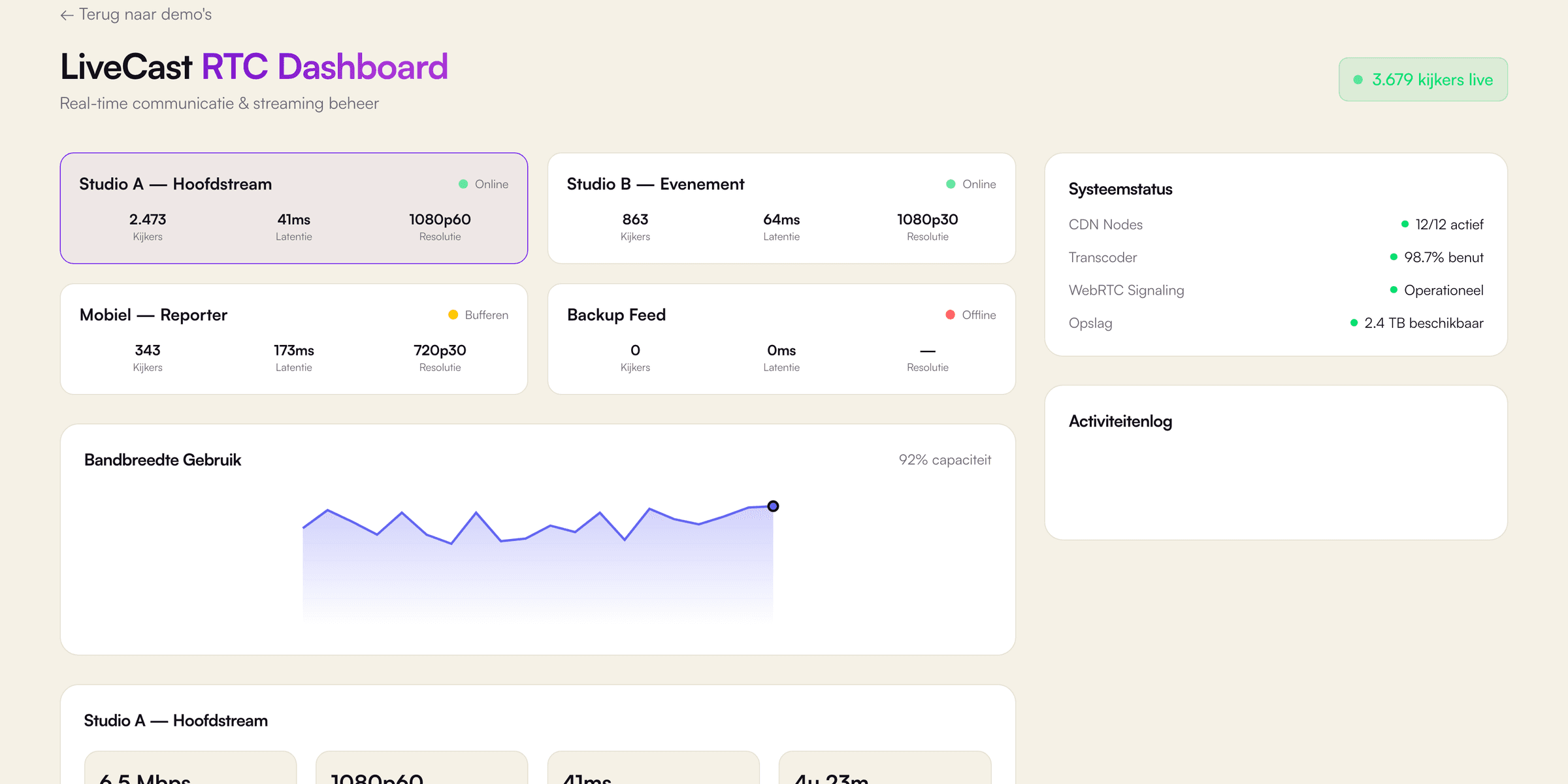
The LiveCast demo is a real-time monitoring dashboard for live video streams, built by VirtuoLab with React, Next.js and TypeScript. First, four channel cards show a main studio stream, an event stream, a mobile reporter and a backup feed. Each card lists viewers, latency and resolution, for example 1080p60 for the main studio stream, plus a coloured status of online, buffering or offline. Second, a bandwidth chart shows usage as a percentage of capacity, between 55% and 98% in the simulation. Third, a click on a channel opens details for bitrate, resolution, latency and uptime. Additionally, a system status panel lists CDN nodes, the transcoder, WebRTC signalling and storage. An activity log adds a new event every 2.5 seconds, coloured as info, success, warning or error, and keeps the latest 50 entries. Every figure is simulated in the browser, and the interface is available in Dutch, English and German.
Which business problem does a real-time monitoring dashboard like LiveCast solve, and for whom?
A real-time monitoring dashboard is a single screen with the live status of every stream, service or device. The business problem is late discovery: without such a screen, operators notice a failing stream only after viewers complain. Broadcasters, event organisers, streaming platforms using WebRTC and IT teams with critical services benefit most. For example, an event stream with 2,000 people watching cannot wait for an email from a viewer. A clear colour code for online, buffering and offline shows at a glance where latency rises or a feed drops, so an operator can act within seconds. Additionally, an activity log with warnings and errors gives the context for a decision, such as a switch to a backup feed. In practice, the same pattern works outside video, for payment terminals across 40 sites. The core is always identical: (1) live status per item, (2) a few key figures and (3) an event log sorted by time. Dashboards by VirtuoLab favour quick reading under pressure.
How does VirtuoLab build a real-time dashboard for a real business?
VirtuoLab builds a real-time dashboard for a real business by connecting a clear interface to live data from existing systems. Step 1 is a scope session about the items to monitor, the key figures and the events which need an alert. Step 2 is design and validation of the screen, comparable to the LiveCast demo. Step 3 is building and testing, for example with Next.js and TypeScript for the interface, a Node.js service with WebSockets for live updates and PostgreSQL for the history. PostgreSQL is a mainstream choice: according to Stack Overflow's Developer Survey 2025, 55.6% of respondents used PostgreSQL. In a real project, VirtuoLab connects existing monitoring tools or devices through the API of each system. Finally, step 4 is launch and support. As an indication, a medium-sized web app costs €10,000 to €25,000 with a lead time of 6 to 12 weeks, and each simple API connection €1,500 to €4,000. The exact price follows after a free introductory call.